
The Ultimate Guide to Wireless CarPlay Adapters: Compatibility, Installation & Best Picks for 2024
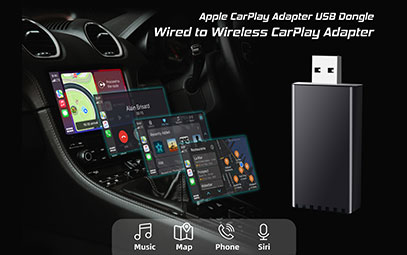
Apple CarPlay has revolutionized the in-car experience, seamlessly integrating your iPhone with your vehicle's infotainment system. While many newer cars come with wireless CarPlay support, most vehicles on the road today only have wired CarPlay functionality. This is where wireless CarPlay adapters come in – compact devices that bridge the gap, transforming your factory wired system into a convenient wireless experience.
In this comprehensive guide, we'll explore everything you need to know about wireless CarPlay adapters, from compatibility checks and installation processes to the best products on the market in 2024. Whether you drive a Honda Civic, BMW 5 Series, or Toyota RAV4, you'll find the perfect solution to cut the cord and enjoy true wireless freedom.

What is a Wireless CarPlay Adapter?
A wireless CarPlay adapter is a small dongle that plugs into your car's existing USB port, enabling wireless communication between your iPhone and your car's infotainment system. These devices typically use Bluetooth for initial pairing and Wi-Fi for data transmission, ensuring stable connectivity and high-quality audio streaming.
Key Benefits:
Eliminate cable clutter in your car's interior
Automatic connection when you enter your vehicle
Retain full functionality of steering wheel controls and touchscreen
Preserve phone battery by allowing simultaneous wireless charging
Compatibility Check: Does Your Car Support Wireless CarPlay Adapters?
Most cars with factory-installed wired CarPlay can work with wireless adapters, but compatibility varies by manufacturer and model year.
Generally Compatible Brands:
Honda (2018 and newer models)
Toyota/Lexus (2019+ with wired CarPlay)
Hyundai/Kia (2018+ with compatible infotainment)
Ford (Sync 3 and later systems)
BMW (2015+ with iDrive 5.0 or newer)
Mercedes-Benz (2016+ with COMAND or MBUX)
Verification Steps:
Check your owner's manual for Apple CarPlay support
Confirm your system has a USB port designated for CarPlay
Visit the adapter manufacturer's website for specific compatibility tools
Review user forums for your specific make and model
Pro Tip: Some vehicles may require a software update before using wireless adapters. Check with your dealer if you experience compatibility issues.
Installation Guide: How to Set Up Your Wireless CarPlay Adapter
Step-by-Step Process:
Park your vehicle in a safe location and ensure the engine is running (or accessory power is on)
Locate your CarPlay USB port (typically in the center console or dashboard)
Plug in the wireless adapter to the USB port
Wait for indicator lights (usually blue or green blinking)
On your iPhone, go to Settings > Bluetooth and pair with the adapter
Follow on-screen prompts on your car's display
Test functionality with music, maps, and phone calls
Troubleshooting Common Issues:
No connection: Restart both your car and iPhone, then retry
Audio dropouts: Ensure the adapter isn't overheating and has adequate ventilation
Laggy response: Check for firmware updates via the manufacturer's app
Incompatible error: Verify your vehicle is on the supported models list
Technical Considerations When Choosing an Adapter
Wi-Fi Frequency: 2.4GHz vs 5GHz
2.4GHz: Better range but more susceptible to interference from other devices
5GHz: Faster connection with less interference but shorter range
Most modern adapters support both bands and automatically select the optimal frequency.
Latency and Audio Quality
Lower latency (below 100ms) ensures that audio stays synchronized with video content and touch responses feel immediate. Look for adapters with aptX audio support if you're particular about sound quality.
Heat Management
Prolonged use can cause adapters to overheat, leading to disconnections or shutdowns. Choose models with metal housings and heat dissipation technology for reliable performance during long drives.
Frequently Asked Questions
Does wireless CarPlay reduce phone battery faster?
While wireless communication does consume more power than wired connections, most users don't notice significant battery drain during typical driving sessions. Using a wireless charging pad can offset this increased power consumption.
Can I use my phone while connected wirelessly?
Yes, you can still use your phone normally while connected to wireless CarPlay. However, for safety reasons, it's best to use voice commands or the car's touchscreen interface while driving.
Do wireless adapters work with all iPhone models?
Wireless CarPlay adapters work with iPhone 5 and later models running iOS 10.0 or newer. However, for optimal performance, we recommend iPhone 8 or newer with the latest iOS version.
Can I switch back to wired connection when desired?
Absolutely! You can always unplug the wireless adapter and connect your iPhone directly via USB if you prefer a wired connection or need to conserve phone battery.
Conclusion: Is a Wireless CarPlay Adapter Right for You?
Wireless CarPlay adapters offer a convenient and relatively affordable way to upgrade your driving experience without replacing your entire infotainment system. For most users, the convenience of wireless connectivity far outweighs the modest investment required.
When choosing an adapter, prioritize compatibility with your specific vehicle, reliable performance, and good heat management. Read recent reviews and check forum discussions for your particular make and model to ensure the best experience.
Remember that technology evolves rapidly – what works today might need a firmware update tomorrow, so choose a manufacturer known for ongoing product support and regular updates.
Ready to cut the cord? Check out our recommended adapters above and enjoy the wireless freedom you've been missing!
You might also like


- None
- CONTACT INFO
-
Address:B920 Yousong Tech Building, Donghuan 1st Road, Longhua District, Shenzhen China 518131
Email:sales@kremersino.com
Skype:2418489304@qq.com
Telegram:@MichaelKremersino
WhatsApp:+86 18565773365
- ABOUT US
- Company Profile FAQ Video Technology
